The Waver AI multi-camera video generator is transforming the way creators build cinematic, multi-scene, and story-driven videos. Whether you want to produce narrative sequences, dynamic sports shots, product showcases, or visually rich creative content, Waver 1.0 provides the technical foundation needed to generate compelling videos with consistent style, smooth framing, and high-quality motion. You can explore all features directly at the official experience page:
👉 https://www.waverai.app/Waver-1.0
This guide explains how the Waver AI multi-camera video generator works, why creators are turning to it for advanced storytelling, and how you can use it to craft cinematic, multi-shot videos with ease.
Why the Waver AI Multi-Camera Video Generator Matters
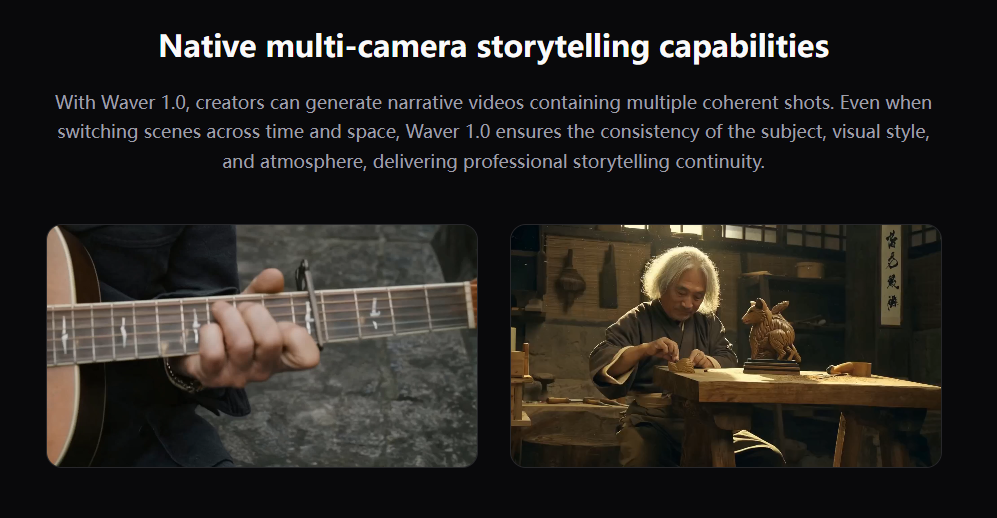
Modern creators want more than simple short clips—they want continuity, coherence, and emotional impact. The Waver AI multi-camera video generator enables multi-sequence storytelling, preserving character identity, camera logic, and atmospheric consistency across transitions. This makes it ideal for creators who want professional-grade results without traditional filming tools.
Waver 1.0 stands out because it supports:
Consistent subjects across multiple camera angles
Smooth transitions between scenes, locations, or time periods
Cinematic video structures similar to professional multi-camera shooting
Flexible visual styles ranging from realistic to animated
5-second and 10-second video durations
High-quality output suitable for content creation, marketing, and social media
These features elevate Waver AI beyond a simple generation tool—turning it into a versatile production assistant for modern digital storytelling.
What Makes Waver AI Different?
1. Native Multi-Camera Storytelling
Traditional video generators often struggle with visual continuity when switching angles or scenes. The Waver AI multi-camera video generator is built with a native architecture that preserves:
Character identity
Lighting
Style
Atmosphere
Clothing and pose details
Even during complex transitions, the system maintains coherence, creating a professional multi-shot experience.
2. Support for 5s and 10s Cinematic Clips
Most AI models limit video length to only a few seconds. Waver 1.0 supports longer generation (5s and 10s), making:
Emotions more expressive
Movements more complete
Story arcs more meaningful
Scenes more immersive
This gives creators the flexibility needed for narrative sequences, advertisements, or product showcases.
3. Multi-Style Artistic Flexibility
The Waver AI multi-camera video generator supports a broad range of visual styles:
Realistic
Animation
Clay
Plush
Artistic stylizations
This makes the tool suitable for film, branding, e-commerce, creative experiments, and stylized visual design.
4. Breakthrough in Sports Motion Generation
Sports scenes are some of the hardest for AI due to rapid motion and complex body dynamics. Waver 1.0 achieves realistic athlete movements, strong motion fidelity, and scene consistency—setting a new standard for sports video synthesis.
How to Use the Waver AI Multi-Camera Video Generator
Using Waver 1.0 is simple and intuitive. Here’s the full workflow:
Step 1: Choose Your Mode
Select one of the available creation paths:
Text-to-video: describe your scene or story
Image-to-video: upload a reference image to guide the visuals
Step 2: Enter Your Prompt
Write a clear description of the action, environment, style, and mood.
For multi-camera storytelling, include details such as:
Camera transitions
Scene changes
Character actions
Atmosphere and lighting
A well-structured prompt leads to more cinematic outputs.
Step 3: Generate Your Video
Waver 1.0 will render the scene in high quality (up to 1080p) with smooth 24fps motion.
The system automatically handles:
Camera shifts
Timing
Style adherence
Subject consistency
Step 4: Download & Share
Export the result and use it across your creative, educational, or professional workflow.
Best Practices for Using the Waver AI Multi-Camera Video Generator
1. Use Clear Scene Descriptions
Specify where each shot takes place:
“Close-up of the main character facing the camera”
“Wide-angle shot as the character walks through the city”
2. Add Atmosphere and Style Cues
Mention mood and tone:
Cinematic
Dramatic lighting
Soft ambiance
Fast sports action
3. Describe Camera Movements
The generator responds well to camera instructions like:
“Camera pans from left to right”
“Smooth zoom-in on subject”
“Cut to an overhead shot”
4. Use Reference Images
Image-to-video helps build:
Style control
Design consistency
Product accuracy
Character continuity
5. Keep Prompts Structured
A clear format such as action → camera → environment → style improves stability.
Applications of the Waver AI Multi-Camera Video Generator
For Content Creators
Build cinematic videos for YouTube, Instagram, TikTok, and short-form storytelling.
For Marketers
Create attention-grabbing visuals, promotional clips, and brand storytelling sequences.
For E-commerce
Turn product images into dynamic visuals that showcase details and motion.
For Educators and Trainers
Produce compelling lesson visuals, demonstrations, and motion-based explanations.
For Filmmakers & Creative Designers
Prototype scene ideas, animation concepts, and visual directions.
Final Thoughts: Why Waver AI Is the Future of Multi-Camera Video Generation
The Waver AI multi-camera video generator represents a new era of narrative video creation—one guided by AI, driven by creativity, and built for modern multi-scene storytelling. Whether you’re producing cinematic sequences, commercial visuals, sports actions, or character-driven short films, Waver 1.0 delivers the structure and consistency needed to bring ideas to life.
To experience everything described in this guide, you can explore the full feature set here:
👉 https://www.waverai.app/Waver-1.0