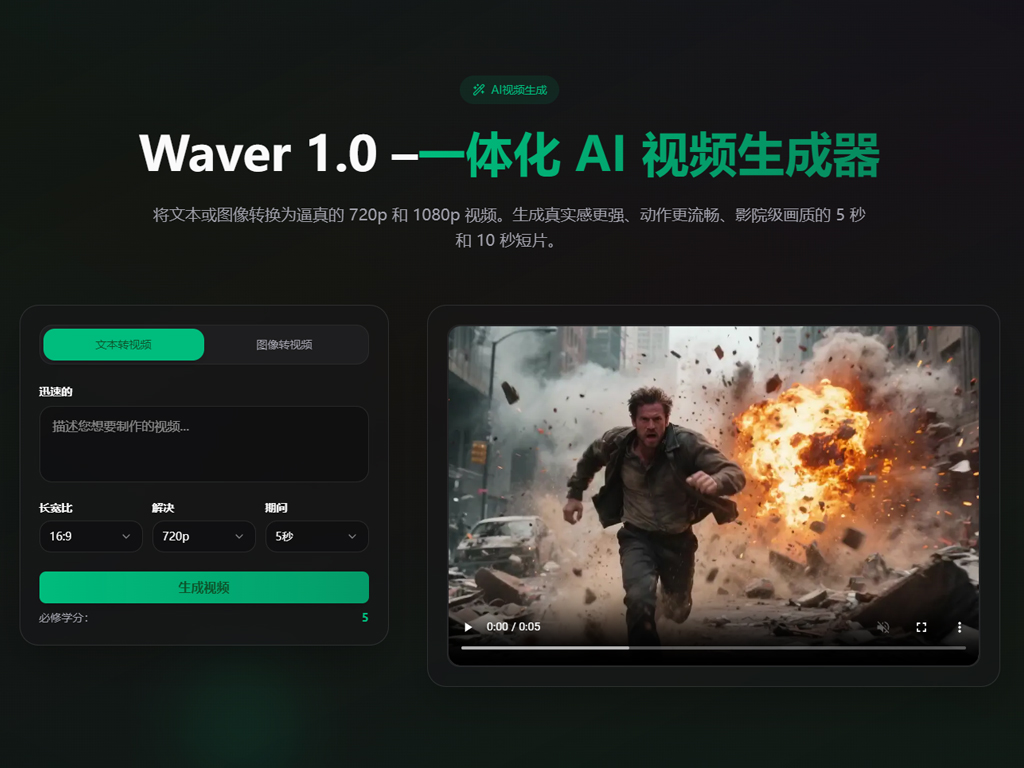
In a world where video content reigns supreme, the demand for faster, more efficient video creation tools has never been greater. Whether you’re a marketer, content creator, or social media influencer, the ability to create high-quality videos quickly is a game-changer. Enter Waver AI – a revolutionary AI-driven video creation tool designed to make video production accessible, efficient, and scalable.
Inspired by the success of AI tools like ByteDance’s Waver 1.0, Waver AI takes video creation to the next level. But what makes Waver AI Video Creation Tool stand out from the crowd? Let’s dive in.
What is Waver AI?
Waver AI is an advanced video creation platform that leverages cutting-edge artificial intelligence to generate professional-quality videos with minimal effort. From automatic editing to real-time video generation, Waver AI allows creators to focus on their creative process while the AI handles the technical work.
Unlike traditional video editing software, Waver AI integrates AI-powered editing features that eliminate the need for manual editing, complex timelines, or long rendering times. Instead, creators can use the Waver AI Video Creation Tool to generate content instantly, whether it’s a social media clip, a marketing video, or an educational tutorial.
To start creating with Waver AI, visit WaverAI, where you can begin transforming your ideas into video in a matter of minutes.
Why Waver AI is the Future of Video Creation
The demand for quick and high-quality video content is growing exponentially, especially on platforms like TikTok, Instagram, and YouTube. As a result, many content creators are turning to AI-driven tools to automate and speed up their video production workflows. Here’s why Waver AI Video Creation Tool is setting a new standard:
1. Real-Time Video Generation
One of the most groundbreaking features of Waver AI is its real-time video creation. Gone are the days of waiting for hours while your video renders. With Waver AI Video Creation Tool, you can generate entire videos in real time. This allows for rapid feedback and quick adjustments, making it an ideal solution for fast-paced content creation environments.
2. Seamless Audio-Visual Synchronization
A common challenge with traditional AI video generators is the issue of audio and video desynchronization. With Waver AI, however, this problem is eliminated. The Waver AI Video Creation Tool ensures that lip sync and audio are perfectly aligned, providing a more polished and professional output. This is especially valuable for creators who need bilingual or multilingual videos, where lip-syncing across different languages is crucial.
3. Smart Motion Synthesis
Another impressive feature of Waver AI is its smart motion synthesis. The Waver AI Video Creation Tool adds subtle movements like head turns, eye blinks, and even realistic camera pans to your videos, making them feel more lifelike and cinematic. Whether you’re using images, text, or audio, Waver AI uses its intelligent algorithms to generate dynamic, engaging video content with minimal input.
4. Perfect for Social Media Content Creation
Social media platforms like Instagram, TikTok, and YouTube require video content that is not only engaging but also fast to produce. The Waver AI Video Creation Tool is optimized for short-form video production, allowing creators to produce high-quality videos that fit the fast-paced demands of social media. With its easy-to-use interface and rapid generation speeds, Waver AI is the ideal solution for creators looking to stay on top of trends.
5. User-Friendly Interface
Another standout feature of Waver AI is its simple, intuitive user interface. Whether you’re a seasoned content creator or just getting started with AI video tools, Waver AI makes the video creation process easy and accessible. Simply input your text, upload an image, or record an audio clip, and let Waver AI Video Creation Tool do the rest.
How to Use Waver AI Video Creation Tool
Getting started with Waver AI is incredibly easy. Here’s a step-by-step guide on how to create a video using the Waver AI Video Creation Tool:
Start with Content: Upload an image, input a text script, or record your voiceover directly on the platform.
Customize Your Video: Choose your desired style, motion effects, and audio settings. You can select from a variety of templates or adjust settings to fit your creative vision.
Generate the Video: With just one click, Waver AI processes your content, synchronizing motion and audio in real time.
Preview and Adjust: Watch your video come to life instantly. Make any adjustments needed, and the tool will update the video in real time.
Download and Share: Once you’re satisfied with the result, download your video in the desired format and share it directly to social media or your website.
Why Choose Waver AI?
With the Waver AI Video Creation Tool, creators can produce high-quality, professional videos with speed and ease. Whether you’re creating content for social media, marketing, or educational purposes, Waver AI simplifies the video production process. By automating time-consuming tasks, it empowers creators to focus on their vision, not the technicalities.
Ready to experience the power of AI video creation? Visit WaverAI to get started today and explore the future of video production.